Opera Cloud is the hotel management software that runs the front desk, reservations, housekeeping, and billing of some of the world’s most recognized hotel brands. If you work in hospitality or manage a property, you have almost certainly come across this name. But what exactly is Opera Cloud? How does the login system work, and what can the platform actually do for a hotel operation?
This guide covers everything from the basics to the login process, key modules, integrations, and how Opera Cloud stacks up against alternatives.
What Is Opera Cloud?
Opera Cloud is a cloud-based Property Management System (PMS) developed by Oracle Hospitality. A PMS is the central software platform hotels use to manage daily operations, from taking reservations to processing guest checkouts and tracking room status in real time.
Oracle built Opera Cloud as the next-generation version of its long-running Opera 5 system. The core difference is infrastructure. Opera 5 runs on physical servers installed on the hotel premises, which means IT costs, hardware maintenance, and limited remote access. Opera Cloud runs entirely on Oracle’s cloud infrastructure, which means hotels access it through a web browser from any device, anywhere.
The platform serves hotels of every size, from small boutique properties to global chains managing hundreds of locations through a single system. Major brands like Marriott, Hilton, and Hyatt have used the Opera ecosystem for years because of its reliability at scale.
Who Uses Opera Cloud?
Opera Cloud is not just for large luxury resorts. The platform scales to fit different property types and operation sizes.
Boutique Hotels use Opera Cloud to manage reservations, guest communication, and housekeeping from one browser-based system without investing in local servers or dedicated IT staff.
Hotel Chains rely on Opera Cloud’s multi-property architecture to standardize operations across locations, share guest profiles between properties, and monitor performance metrics in real time from a central dashboard.
Resorts and Mixed-Use Properties use the Vacation Ownership module to manage a combination of hotel rooms, condominium units, and vacation rentals within a single platform.
Casino Hotels and high-volume urban properties depend on Opera Cloud’s cashiering, billing, and group management capabilities to handle complex transactions at high speed.
Opera Cloud Login: How Access Works
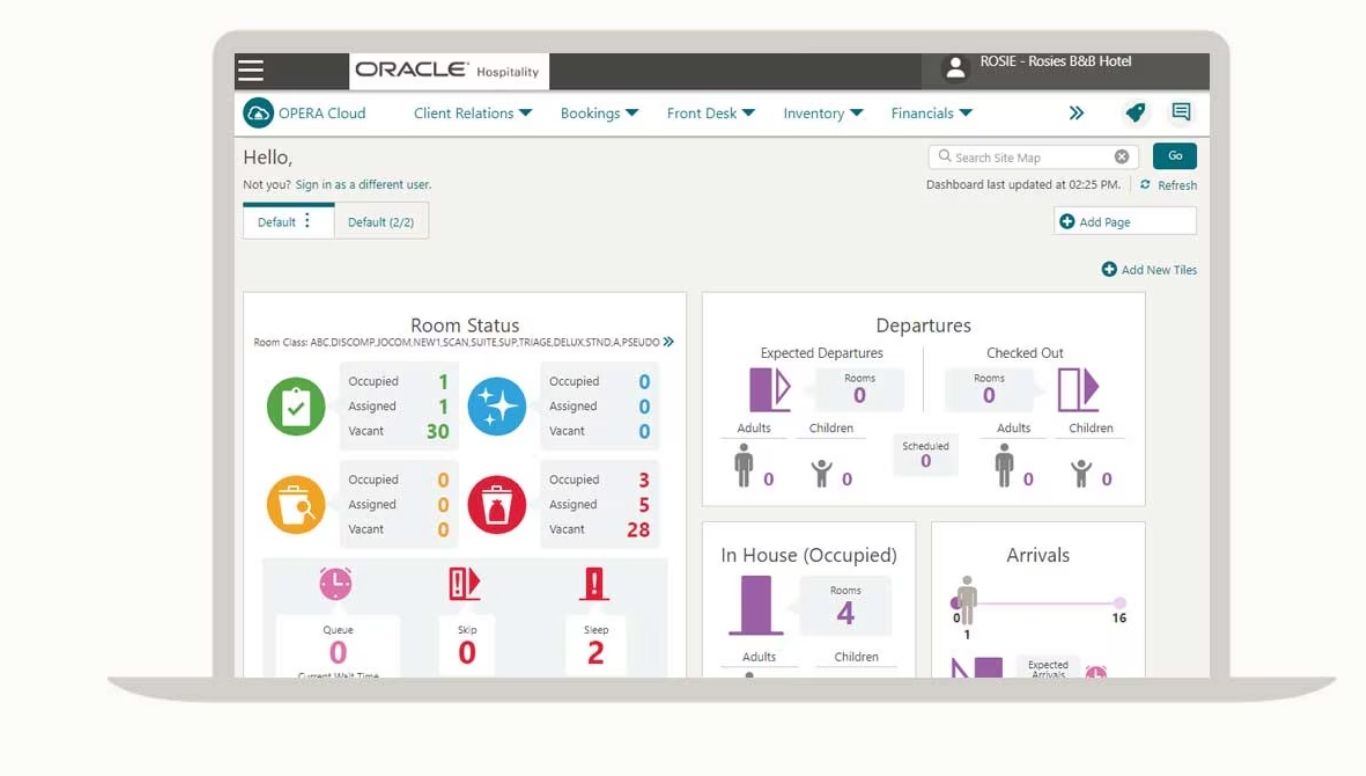
The Opera Cloud login process differs from consumer software login systems. There is no single public URL you visit to sign in. Each hotel property operates in a unique environment, URL issued and managed by Oracle.
How the Login URL Works
Your hotel’s IT administrator or system administrator provides the property-specific login URL. It follows a format similar to:
https://[yourhotelname]-oc.oracleindustry.com/OPERA9/opera/operacloud
This URL points to your specific Opera Cloud environment. Entering any other URL will not give you access to your property’s data.
Step-by-Step Login Process
- Open a web browser (Chrome, Firefox, or Safari all work)
- Paste the property URL provided by your hotel’s IT team into the address bar
- Press Enter to reach the Opera Cloud login page
- Enter your username and password provided by your company
- Click the Login button
- If it is your first login, the system will prompt you to set a new password
- After logging in, you land on the Opera Cloud dashboard
Login Security and User Roles
Opera Cloud uses Oracle Identity Cloud Service for authentication. Access to different modules depends on the role assigned to your user account. A front desk agent sees arrival and departure queues. A housekeeping supervisor sees the housekeeping board. A revenue manager accesses rate management and reporting. Administrators control what each role can view and edit.
For corporate or chain-level access, Opera Cloud supports Single Sign-On (SSO) so staff can use their corporate credentials to access multiple properties without managing separate login credentials for each one.
Forgotten Password or Locked Account
If you forget your password, use the “Forgot Password” option on the login page. Opera Cloud sends a reset link to your registered email. For locked accounts, contact your hotel’s system administrator or Oracle Support directly, since property administrators can unlock accounts and reset credentials.
Key Modules Inside Opera Cloud
Opera Cloud organizes its features into modules. Hotels choose which modules they activate based on their property type and operational needs. This pay-for-what-you-use model means a small limited-service hotel does not pay for modules it never uses.
Reservations
The Reservations module handles the entire booking lifecycle. Staff can create individual reservations, manage group blocks, handle multi-segment bookings, and process reservation modifications or cancellations. The system provides real-time room availability across multiple dates and properties, preventing overbookings automatically.
Rate management lives within this module, too. Revenue managers set rate schedules, apply yield strategies, define promotional rates, and link rates to specific booking channels.
Front Desk
The Front Desk module is where check-in, check-out, and in-house guest management happen. Features include automatic room blocking, one-stroke check-in, rapid walk-in processing, and batch room assignment for high-arrival days.
Staff can send guest messages, manage wake-up calls, issue key packets, and process room assignments all from this workspace. The mobile-enabled design means front desk agents are not chained to a physical desk. They can serve guests anywhere on the property using a tablet or smartphone.
Housekeeping
The Housekeeping module gives housekeeping supervisors a real-time board showing the status of every room in the property. Room statuses include Clean, Dirty, Inspected, Out of Order, Out of Service, and Pickup (for rooms that need only a light refresh).
Supervisors assign task sheets to attendants, track cleaning progress, log maintenance requests, and manage discrepancies between front office room status and actual housekeeping status. The housekeeping mobile app extends these capabilities to attendants’ phones so they update room status as they complete work without returning to a central station.
Cashiering and Billing
The Cashiering module handles all financial transactions tied to a guest’s stay. This includes posting room charges, processing payment settlements, handling cash, managing credit card transactions, and performing night audits without interrupting daily operations.
Multi-currency support and multi-language billing mean international properties process transactions in local currencies and produce folios guests can read in their language.
Guest Profiles
Opera Cloud maintains a detailed profile for every guest, company, travel agent, and group in the system. Profiles capture preferences, stay history, spending patterns, communication preferences, and any special notes added by staff.
When a returning guest checks in, staff immediately see their preferences, making personalized service the default rather than the exception. The profile system also supports loyalty programs, allowing properties to track points, offer upgrades, and process reward redemptions.
Reporting and Analytics
The reporting module gives management access to live performance data including occupancy rates, average daily rate (ADR), revenue per available room (RevPAR), and guest satisfaction metrics. Managers customize dashboards with over 30 preconfigured tiles focused on front desk, revenue, inventory, and housekeeping.
Reports run at any time without system downtime, and management teams can access them from any device. This real-time visibility allows faster responses to changes in demand or operational performance.
Opera Cloud vs Opera 5: Key Differences
| Feature | Opera Cloud | Opera 5 |
| Infrastructure | Cloud-based, no local servers | On-premise, local servers required |
| Access | Browser or mobile, anywhere | Physical terminals or VPN |
| Updates | Automatic, continuous from Oracle | Manual updates, IT involvement needed |
| Integration | REST APIs via OHIP, self-service | Legacy interfaces, approval-based |
| Scalability | Scales easily, multi-property ready | Hardware expansion required |
| Cost Model | Subscription, pay per module | Licensing plus hardware investment |
| User Interface | Modern, mobile-optimized | Functional but older design |
Opera 5 remains in active use at many properties, particularly those that made significant infrastructure investments before Opera Cloud launched. For new implementations today, Oracle pushes operators toward Opera Cloud.
How Opera Cloud Integrations Work
Opera Cloud connects to third-party systems through the Oracle Hospitality Integration Platform (OHIP). OHIP is a self-service developer portal with over 3,000 REST API endpoints. Hotels and vendors use it to build connections between Opera Cloud and external software without waiting for Oracle approval.
Common integrations include:
Global Distribution Systems (GDS) for connecting Opera Cloud inventory and rates to travel agency booking channels like Amadeus and Sabre.
Online Travel Agencies (OTA) including Booking.com and Expedia for real-time rate and availability synchronization that prevents overbooking.
Point of Sale (POS) systems, particularly Oracle MICROS Simphony, for posting food and beverage charges directly to a guest’s room folio.
CRM Platforms for enhanced guest relationship management and targeted marketing based on stay history.
Payment Processors and digital wallets for contactless and secure payment processing at check-in and checkout.
Guest Messaging Platforms for automated pre-arrival communications, confirmations, and in-stay service requests via SMS or email.
Opera Cloud Pricing
Oracle does not publish Opera Cloud pricing publicly. Costs depend on property size, number of rooms, modules selected, and whether the hotel is a single property or part of a chain. For a quote, contact Oracle Hospitality directly or work with an authorized Oracle Hospitality implementation partner.
Comparable cloud-based hotel PMS solutions in the market range from $80 to $200 per month for basic configurations. Opera Cloud, given its enterprise features and global compliance capabilities, sits at the higher end of the market and is generally best suited to medium, large, or multi-property hotel groups.
Opera Cloud Training and Certification
Oracle provides structured training for Opera Cloud users through Oracle MyLearn. A free entry-level course called Learning Explorer covers the Oracle Cloud infrastructure and gives users an overview of the platform. More advanced paid courses take users through specific modules with practical exercises.
Many certified Opera Cloud trainers and implementation partners also offer on-site or remote training for hotel teams. New staff typically become operational within a day or two, and experienced hospitality professionals familiar with any PMS generally make the transition quickly given Opera Cloud’s intuitive interface design.
Common Searches Related to Opera Cloud
People researching Opera Cloud ask a wide range of questions that go beyond the product itself. Here is what different user types look for.
Hotel staff typically search for login help, module navigation, housekeeping board instructions, and how to process specific transaction types.
IT administrators search for integration documentation, OHIP API access, user role configuration, and identity management setup.
Hospitality students look for Opera Cloud training resources, certification options, and career relevance of knowing the platform.
Hotel owners and decision-makers compare Opera Cloud to alternatives, ask about pricing, and look for implementation timelines.
Understanding this range of users matters because Opera Cloud serves all of them through the same platform, with different access levels and module configurations for each.
Frequently Asked Questions
What is Opera Cloud in simple terms?
Opera Cloud is hotel management software made by Oracle. Hotels use it to manage bookings, check-ins, checkouts, housekeeping, billing, and guest data through a cloud-based system accessible from any browser or mobile device.
How do I log in to Opera Cloud?
Your hotel’s IT administrator provides a property-specific URL for your Opera Cloud environment. You enter that URL in your browser, then sign in with the username and password your company issued you.
Is Opera Cloud the same as Oracle Opera?
Opera Cloud is Oracle’s cloud-based version of its Opera Property Management System. Oracle also offers Opera 5, which is the older on-premise version. When people say “Oracle Opera” they may mean either version; Opera Cloud specifically refers to the cloud-hosted product.
Can Opera Cloud work on mobile devices?
Yes. Opera Cloud is device-agnostic and runs in any web browser. Oracle also provides a dedicated housekeeping mobile app for attendants and supports mobile check-in and checkout for front desk staff.
What is OHIP in Opera Cloud?
OHIP stands for Oracle Hospitality Integration Platform. It is the self-service developer portal hotels and vendors use to connect Opera Cloud to third-party systems via REST APIs. It replaces older, more complex legacy integration methods.
How long does it take to learn Opera Cloud?
Most hotel staff become comfortable with Opera Cloud within one to two days of training. Experienced hospitality professionals who have used other PMS platforms often adapt faster due to similar workflows.
Does Opera Cloud work for small hotels?
Opera Cloud offers modular pricing, meaning small hotels pay only for the features they need. However, the platform is generally more cost-effective for medium to large properties or groups where the full feature set justifies the investment.
What happens if I forget my Opera Cloud password?
Use the “Forgot Password” link on the login page. Opera Cloud sends a reset link to your registered email address. If your account is locked, contact your hotel’s system administrator.
Is Opera Cloud available in multiple languages?
Yes. Opera Cloud supports operations in 20 languages and handles billing and compliance in more than 200 countries and territories, including multi-currency and multi-tax configurations.
How does Opera Cloud handle multi-property management?
Hotel chains use Opera Cloud’s centralized architecture to run operations across multiple properties from a single system. Guest profiles, rates, and inventory share across properties, and management can view consolidated performance reports in real time.
What is the difference between Opera Cloud Lite, Standard, and Premium?
Opera Cloud offers three service tiers: Lite (30 functions), Standard (55 functions), and Premium (unlimited functions). Hotels choose the tier that matches their operational complexity and budget.
Does Opera Cloud integrate with Booking.com and Expedia?
Yes. Opera Cloud connects directly to major online travel agencies including Booking.com and Expedia through OHIP integrations, keeping room availability and rates synchronized automatically.

Hi, I’m Sidra Azeemi, a freelance content writer and guest post specialist with 3+ years of experience. I offer content writing and on-page SEO services. I write about celebrities, net worth, and entertainment.