
Your Instagram bio has exactly 150 characters to make someone stop scrolling and hit Follow. That is a tiny window, and using the same plain default text as everyone else is not going to cut it.
The good news? You do not need to be a designer or pay for expensive apps. Instagram bio font generators let you convert boring text into bold, cursive, aesthetic, or gothic styles in seconds, then copy and paste them straight into your bio. Zero installations. Zero hassle.
Whether you are on Android or iOS, this list covers the 10 best tools available right now in 2026. From dedicated apps on the Play Store and App Store to powerful browser-based generators, there is something here for every creator, brand, and casual user.
The best Instagram bio font generators work by converting your text into Unicode characters, not actual font files. This is why the styled text looks the same for everyone who views your profile, across Android, iOS, and desktop.
Why You Should Use Custom Fonts in Your Instagram Bio?
Still on the fence about switching up your bio text? Here is why custom fonts are worth it:
- Stand out instantly. When every profile uses the same default Instagram font, a styled bio catches the eye immediately. It signals creativity before someone even reads what you wrote.
- Build brand identity. Consistent use of a particular font style, elegant cursive for a lifestyle brand, bold caps for a fitness account, creates a visual language people associate with you.
- Highlight what matters. Use a fancy font for your name or a key phrase like your tagline or CTA. It draws attention to the most important part of your bio without adding extra characters.
- Boost profile engagement. A visually polished bio increases the chance that visitors click your link, explore your posts, or hit Follow.
- Works everywhere. These Unicode-based fonts display correctly on Instagram Stories, captions, Reels descriptions, and comments too, not just the bio.
Comparison Table
| Tool | Platform | Key Feature | Font Styles | Price |
| Park Magazines Bio Font Generator | Web (Android & iOS browser) | Real-time generation, one-click copy | 20+ curated styles | Free |
| Park Magazines Premium Fancy Text | Web (Android & iOS browser) | Luxury decorators + border frames | 30+ premium styles | Free |
| Fontify | Android + iOS | Copy per style, Instagram shortcut | 100+ | Free / Freemium |
| Font Bio (Aesthetic IG Fonts) | iOS only | Bio maker + Instagram-optimized | 100+ | Free |
| FancyTextPro | Web | Mobile-friendly, instant copy | 50+ | Free |
| Fonts.Social | Web | 200+ styles, tested cross-platform | 200+ | Free |
| Fontb.com | Web | Clean UI, trending 2026 styles | 150+ | Free |
| AppSorteos Font Generator | Web | Favorites saving feature | Hundreds | Free |
| FontsGeneratorPro | Web | 300+ styles, mobile-ready | 300+ | Free |
| OnlineFontsGenerator | Web | Gothic + Calligraphy + Script | 150+ | Free |
Top 10 Instagram Bio Font Generators (Detailed Reviews)
1. Park Magazines Instagram Bio Font Generator
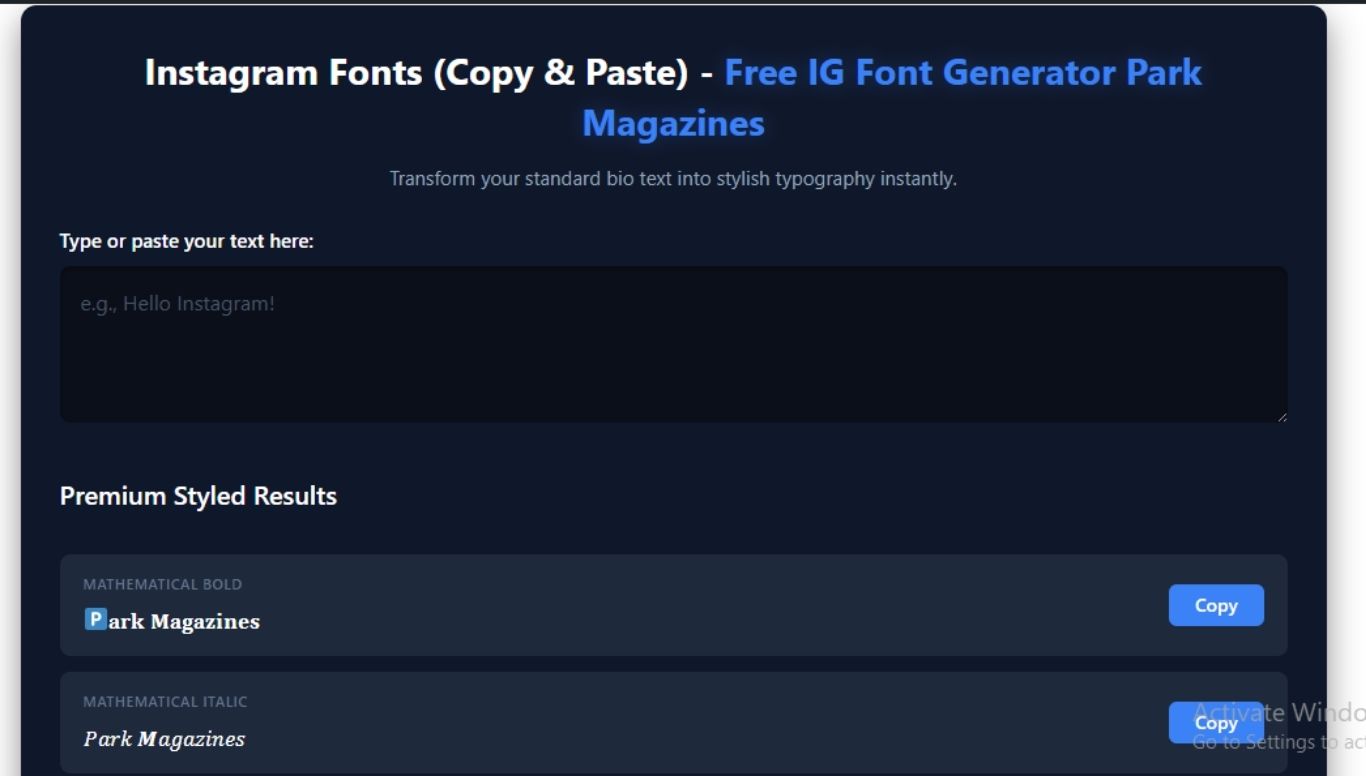
Overview: This is the tool built right here on Park Magazines, and it is genuinely one of the best free options available for mobile users in 2026. You type your text, and all font variations render in real time without clicking any extra buttons. One tap copies your chosen style to the clipboard instantly.
Why we love it: It uses curated Unicode styles filtered for maximum compatibility across Instagram on both Android and iOS. No broken characters, no unreadable math symbols, just clean, beautiful output every time. The one-touch copy mechanism is a game-changer on small mobile screens.
Pros:
- Real-time generation, no processing delay
- One-click copy for each style
- Works perfectly in mobile browsers on Android and iOS
- Styles include Mathematical Bold, Cursive Scripts, Old English Gothic, Double-Struck Outlines, Circles, and Blocks
- No sign-up required
Cons:
- Web-based only (no standalone app download)
Availability: Web, works on Android & iOS browsers
Try it here: Park Magazines Instagram Bio Font Generator
2. Park Magazines Premium Fancy Text Generator
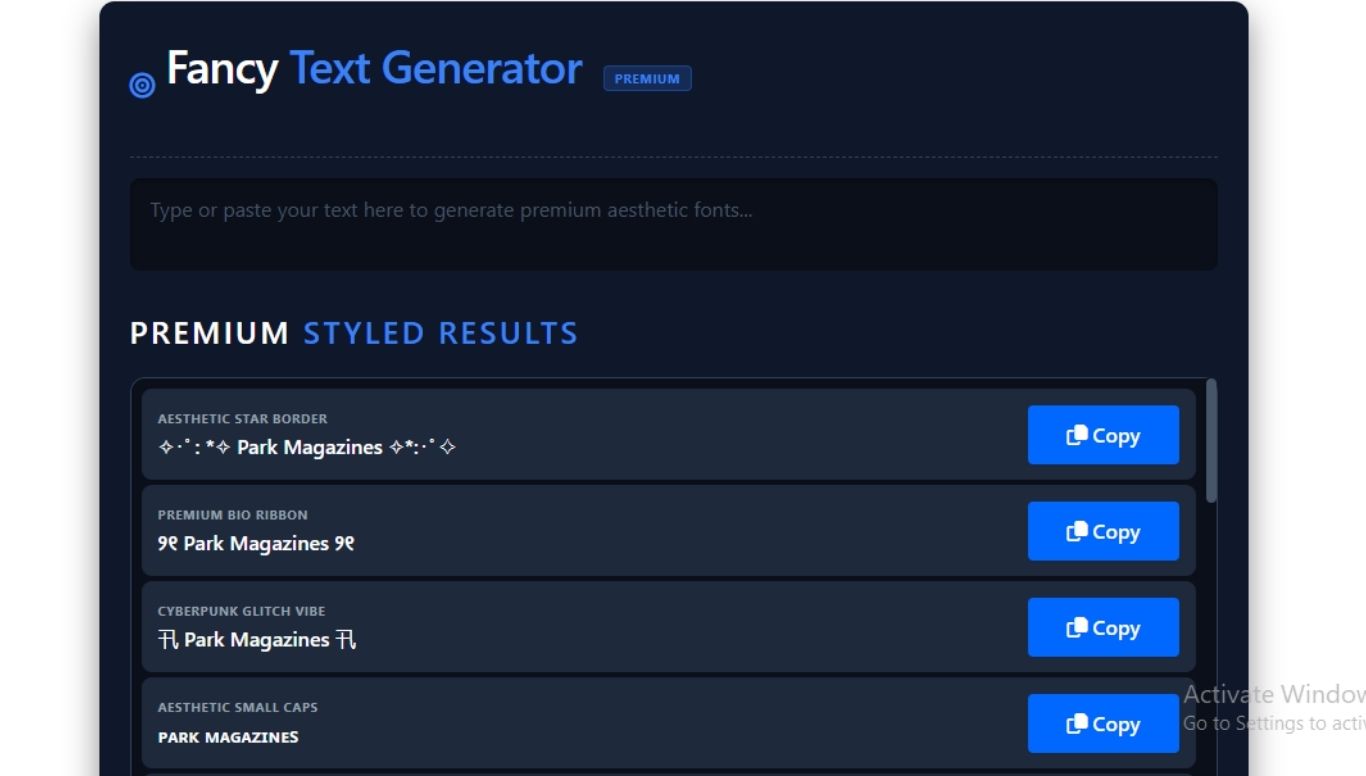
Overview: If you want to go beyond basic font styles and into full luxury aesthetic territory, this is the tool. It offers geometric diamond accents, symmetric border graphics, star-bordered frames, and vaporwave layouts that you simply will not find on most other generators.
Why we love it: Most generators flood you with unreadable characters. This one filters for quality; only high-compatibility styles that look stunning on both iPhones and Android smartphones make it into the output matrix. It is perfect for creators who want their bio to look designed, not just typed.
Pros:
- Premium decorative borders and framing styles
- Filtered output, no junk Unicode strings
- Instant live response as you type
- Ideal for Instagram, TikTok, gaming profiles, and marketing campaigns
- Universal copy-paste stability across all devices
Cons:
- Web-based only
Availability: Web, works on Android & iOS browsers
Try it here: Park Magazines’ Premium Fancy Text Generator
3. Fontify
Overview: Fontify is one of the most downloaded Instagram font apps in the world, trusted by over 2.3 million users. Available on both Android (via Google Play) and iOS (via App Store), it gives you a native app experience rather than requiring you to open a browser.
Why we love it: Every font variation has its own dedicated Copy button, so you can mix and match multiple font styles in the same bio text. It also has a built-in shortcut that takes you straight to Instagram after copying, a small detail that saves real time.
Pros:
- Available as a native app on Android and iOS
- Individual copy button per style, great for mixing fonts
- Includes kaomojis and special symbols
- Supports custom font creation using Unicode characters
- Works across WhatsApp, TikTok, Twitter, Facebook, and iMessage too
Cons:
- Some advanced styles locked behind premium or ad-viewing
- Certain fonts not supported on Android versions older than Oreo
Availability: Android & iOS
4. Font Bio, Aesthetic IG Fonts (iOS)
Overview: Font Bio is an iOS-exclusive app built specifically for Instagram bio customization. It goes beyond just fonts, it includes a full bio maker that helps you craft and structure your entire Instagram introduction, not just style the text.
Why we love it: With over 100 font options and a dedicated bio generator feature, it is the most Instagram-focused app on this list. If you are on an iPhone and want an all-in-one tool that generates the font and helps you write the bio, this is it.
Pros:
- 100+ aesthetic fonts optimized for Instagram
- Built-in Instagram bio maker feature
- Seamless copy-paste into Instagram
- Also works for TikTok, WhatsApp, Snapchat, and Discord
- Optimized specifically for iPhone and iPad
Cons:
- iOS only, not available for Android users
Availability: iOS only (App Store)
5. FancyTextPro (fancytextpro.com)
Overview: FancyTextPro is a long-standing web-based generator with a dedicated Instagram fonts page. It has a mobile-optimized interface and lets you tap any text block to copy the style instantly.
Why we love it: The interface is dead simple, type in the box, tap to copy. No clutter, no unnecessary features getting in the way. The mobile layout works smoothly on both Android and iOS browsers.
Pros:
- Mobile-friendly web interface
- One-tap copy on any font block
- Large variety of Instagram-specific styles
- No account required
Cons:
- Web-only, no dedicated app
- UI feels slightly dated compared to newer tools
Availability: Web, Android & iOS browsers
6. Fonts.Social
Overview: Fonts.Social is a powerhouse generator with over 200 unique font styles, all tested for compatibility across iOS, Android, Windows, and Mac. It is a no-registration-required tool that delivers clean, copy-ready output.
Why we love it: The sheer volume of styles is impressive, but what sets it apart is the cross-device testing. Every style is verified to render identically on iPhones and Android smartphones, so what you see in the generator is exactly what your followers will see on your profile.
Pros:
- 200+ font styles
- Tested and verified on iOS, Android, Windows, and Mac
- No signup required, completely free
- Works for Instagram, Facebook, Twitter, and other platforms
Cons:
- With 200+ options, finding your preferred style can take time
Availability: Web, Android & iOS browsers
7. Fontb.com Instagram Font Generator
Overview: Fontb focuses specifically on trending 2026 styles, making it a go-to for creators who want their bio to feel current rather than using the same fonts everyone used two years ago.
Why we love it: It clearly highlights which styles are most popular right now, Cursive/Script for elegant accounts, Bold for attention-grabbing content, Fancy Decorated for unique profiles, Small Caps for professional brands, and Bubble fonts for playful aesthetics.
Pros:
- Highlights 2026 trending font styles
- Works on all devices and browsers
- Simple one-click copy functionality
- Free with no limitations
Cons:
- Fewer total styles compared to some competitors
Availability: Web, Android & iOS browsers
8. AppSorteos Instagram Font Generator
Overview: AppSorteos brings one unique feature that most other tools lack, a Favorites system. You can save your preferred font styles to a personal list so you do not have to hunt for them every time.
Why we love it: For creators who have settled on a signature font style for their brand, the favorites feature is genuinely useful. You build your saved list once, and from then on accessing your go-to styles takes seconds.
Pros:
- Save favorite font styles for quick access later
- Hundreds of font options available
- Works on Instagram bio, Stories, Reels, captions, and comments
- Also compatible with WhatsApp, TikTok, Twitter, and Telegram
- Completely free
Cons:
- Web-based only
- Interface is more utility-focused than visually polished
Availability: Web, Android & iOS browsers
9. FontsGeneratorPro
Overview: If variety is your priority, FontsGeneratorPro delivers over 300 Instagram font styles, making it one of the largest libraries on this list. It is built with mobile users in mind, with a responsive layout optimized for phone screens.
Why we love it: It categorizes fonts smartly, Popular, Royal, Stars, Flowers, Geometric, Lines, Symbols, so you are not just scrolling through an endless uncategorized wall of text. The organization makes discovery much faster.
Pros:
- 300+ font styles across organized categories
- Mobile-ready responsive design
- Works for Stories, highlights, bios, captions, and Reels descriptions
- No sign-up or download needed
Cons:
- Larger libraries mean more scrolling before you find the right style
Availability: Web, Android & iOS browsers
10. OnlineFontsGenerator
Overview: OnlineFontsGenerator rounds out this list as the best choice for creators who want a broader range of specialized styles beyond standard fancy text. It includes dedicated Gothic, Calligraphy, and Script generators alongside the main Instagram font tool.
Why we love it: The focus here is on using the right font in the right place, not just generating something flashy. The tool provides guidance on which styles work best for bios vs. captions vs. stories, helping you make smarter choices rather than just picking something random.
Pros:
- Specialized generators for Gothic, Calligraphy, and Script styles
- Guidance on best font choices for different use cases
- Clean, fast interface
- 150+ styles available
Cons:
- Less visually polished than some app-based alternatives
Availability: Web, Android & iOS browsers
How to Change Your Instagram Bio Font (Step-by-Step Guide)
Not sure how the whole copy-paste process works? Here is exactly what to do:
Step 1: Open any font generator from this list, either in your phone’s browser or as an app (for Fontify or Font Bio users).
Step 2: Type or paste your bio text into the input box. The font styles will generate instantly or with one tap.
Step 3: Browse the styles and find one you like. Tap or click the Copy button next to that style.
Step 4: Open Instagram on your phone.
Step 5: Go to your profile and tap Edit Profile.
Step 6: Tap the Bio field and paste your copied styled text (long-press > Paste on mobile).
Step 7: Tap Done or Submit to save your updated bio.
Pro tip: Always preview how your bio looks before saving. Some Unicode styles may display slightly differently between Android and iOS, test on both if you can, or stick to the universally supported styles like Bold, Cursive Script, and Small Caps.
Best Practices for Using Instagram Bio Fonts (Pro Tips)
Using a custom font is easy. Using it well is a different skill. Here are the rules that separate polished profiles from ones that look messy:
Readability First: The whole point of a bio is to communicate. If your chosen font is so decorative that visitors struggle to read it, it is working against you. Stick to styles that are eye-catching but still clearly legible at a glance.
Do Not Overdo It You do not need to style every single word. The most effective approach is to use a fancy font for your name or a single key phrase, your tagline, your niche, and your CTA, and keep the rest in plain or small cap text. Contrast is what creates impact.
Mix Strategically: A common winning combination is a fancy or cursive font for your display name at the top, clean small caps or bold for your bio description, and plain text for your website link or hashtags. This layered approach looks intentional and designed.
Keep Hashtags in Plain Text Hashtags styled in Unicode fancy text may not be indexed properly by Instagram’s search. Always write hashtags in standard text to keep them discoverable.
Accessibility Matters: Screen readers used by visually impaired users often cannot decode dense or heavily decorative Unicode characters. If accessibility is important to your audience, and it should be, use decorative fonts sparingly and keep the core information in readable text.
Test Before You Publish: Type your bio into the generator, copy it, paste it into Instagram’s Edit Profile screen, and check how it actually looks before saving. What renders beautifully in the generator tool occasionally displays slightly differently inside the Instagram app.
Conclusion
Your Instagram bio is the first, and sometimes only, impression you make on a new visitor. Upgrading from plain default text to a styled, intentional font takes less than two minutes and costs nothing.
For the most reliable and cleanest output, start with the Instagram Bio Font Generator for standard styles and the Premium Fancy Text Generator when you want something with more decorative flair. If you prefer a dedicated mobile app, Fontify covers both Android and iOS, and Font Bio is the strongest iOS-only option.
Remember: the goal is not to use the fanciest font available. It is to use the right font that reflects your brand, stays readable, and makes the right people want to hit Follow.
Which font style is currently in your Instagram bio? Drop it in the comments below, we would love to see how you are styling yours.

Hi, I’m Sidra Azeemi, a freelance content writer and guest post specialist with 3+ years of experience. I offer content writing and on-page SEO services. I write about celebrities, net worth, and entertainment.